Neon Downpour: Simulating Cyber Rain Caustics in py5
2026/7/14
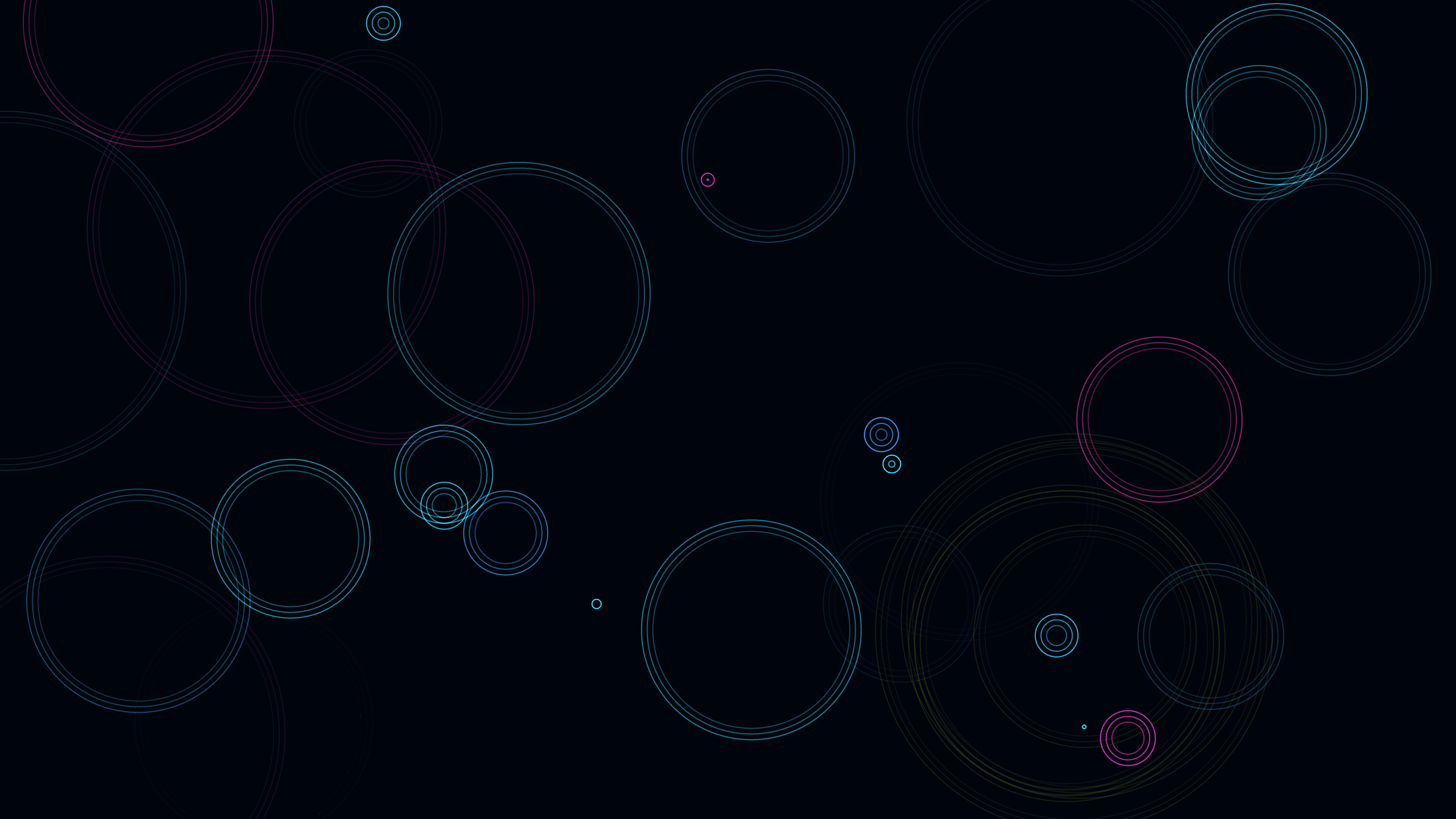
“Cyber Rain Caustics” is a generative media art piece that transforms the melancholic aesthetic of a rain-slicked city street into an abstract, high-energy light show. The artwork presents a stylized, top-down view of glowing, neon-colored rain striking a dark, metallic surface. Rather than focusing on the falling drops themselves, the simulation is entirely dedicated to the aftermath: the expanding ripples that intersect, overlap, and constructively interfere. By utilizing Python and the py5 drawing library, the piece creates intense, chaotic optical caustics, proving that simple 2D particle systems can yield profoundly complex and cinematic results.
Visual & Aesthetic Approach
The aesthetic of “Cyber Rain Caustics” is heavily influenced by the visual tropes of cyberpunk cinema — high-contrast neon light reflecting off wet asphalt in the dead of night. The background of the simulation is a deep, bruised black, serving as a dark mirror for the intense light play above it.
When a “raindrop” hits the surface, it doesn’t just draw a single circle. Instead, it spawns a tightly clustered set of expanding rings. These rings are rendered using additive blending (`py5.blend_mode(py5.ADD)`). When two ripples from different raindrops collide and intersect, their pixel values are added together, creating brilliant, hot-white cores at the points of intersection. This perfectly mimics the physical phenomenon of optical caustics, where curved water surfaces focus light into intense, burning patterns. The color palette is restricted to a tight range of electric cyans, deep blues, and piercing magentas, with occasional, violent bursts of high-saturation yellow simulating sudden heavy splashes or electrical sparks.
Code & Technical Breakdown
To manage the expanding waves of light, the artwork utilizes a custom object-oriented particle system. Every raindrop strike is managed by an instance of the Ripple class.
# From global scope
class Ripple:
    def __init__(self, x, y, hue):
        self.x = x
        self.y = y
        self.radius = 0
        self.max_radius = random.uniform(100, 600)
        self.speed = random.uniform(2, 6)
        self.hue = hue
        self.life = 1.0

    def update(self):
        self.radius += self.speed
        self.life -= 0.01
Why this works: The Ripple class encapsulates all the physical properties of a single water strike. By randomizing the max_radius and speed, the simulation avoids looking artificial; some drops hit hard and expand quickly, while others are gentle and slow. The life variable is crucial — it acts as a normalized timer (from 1.0 down to 0) that allows the ripple to smoothly fade out over time as its energy dissipates into the surrounding “water.”
The true visual magic happens in how these ripples are rendered to the screen. A single thin line expanding outward is not enough to create the complex, burning caustics the aesthetic requires.
# From Ripple class
    def display(self):
        alpha = py5.remap(self.life, 0, 1, 0, 100)
        if alpha < 0: alpha = 0

        # Multiple rings per ripple for caustic effect
        for i in range(3):
            r = self.radius - i * 15
            if r > 0:
                py5.stroke(self.hue, 80, 100, alpha * (1.0 - i * 0.2))
                py5.circle(self.x, self.y, r * 2)
Why this works: Instead of drawing one circle, the display() method draws three concentric rings for every single raindrop. The inner rings are slightly smaller (- i * 15) and slightly more transparent (* (1.0 — i * 0.2)). This simulates the undulating wave-train of a real physical ripple. When dozens of these multi-ring ripples are on screen simultaneously, the number of intersecting lines skyrockets. Because the drawing context is set to additive blending, every single intersection point between these countless rings spikes in brightness, organically creating the chaotic, shimmering webs of light known as caustics.
Finally, to create the illusion of a glowing, reflective surface, the simulation manages the background clearing meticulously.
# From draw()
def draw():
    py5.blend_mode(py5.BLEND)
    py5.background(220, 100, 5, 20)  # Trail effect
    py5.blend_mode(py5.ADD)

    # Spawn new ripples
    if random.random() < 0.3:
        x = random.uniform(0, py5.width)
        y = random.uniform(0, py5.height)

        # Cyberpunk colors: Cyan to Magenta
        hue = random.choice([180, 190, 200, 300, 320]) + random.uniform(-10, 10)
        ripples.append(Ripple(x, y, hue))
Why this works: Before drawing the new state of the ripples, the code switches back to standard alpha blending (py5.BLEND) and draws a highly transparent, very dark blue background (py5.background(220, 100, 5, 20)). This prevents the canvas from blowing out into pure white. Instead, older frames are slowly pushed into darkness. This leaves a ghosting trail behind the expanding ripples, mimicking the way bright neon light scatters and persists in a dense, humid atmosphere or across a wet, oily street.
Conclusion
“Cyber Rain Caustics” demonstrates that highly complex visual phenomena do not always require massive 3D engines or complex ray-tracing algorithms. By combining simple 2D geometry, object-oriented design, and additive blending, the artwork successfully captures the chaotic, emergent beauty of optical caustics. Through Python and py5, the simulation transforms the simple physics of a falling raindrop into a hypnotic, cinematic study of light, geometry, and digital decay.
GitHub: https://github.com/asamiile/py5-media-art/tree/main/sketch/cyber_rain_caustics
Purchase assets: Adobe Stock